AUTONOMOUS DATA ANALYST
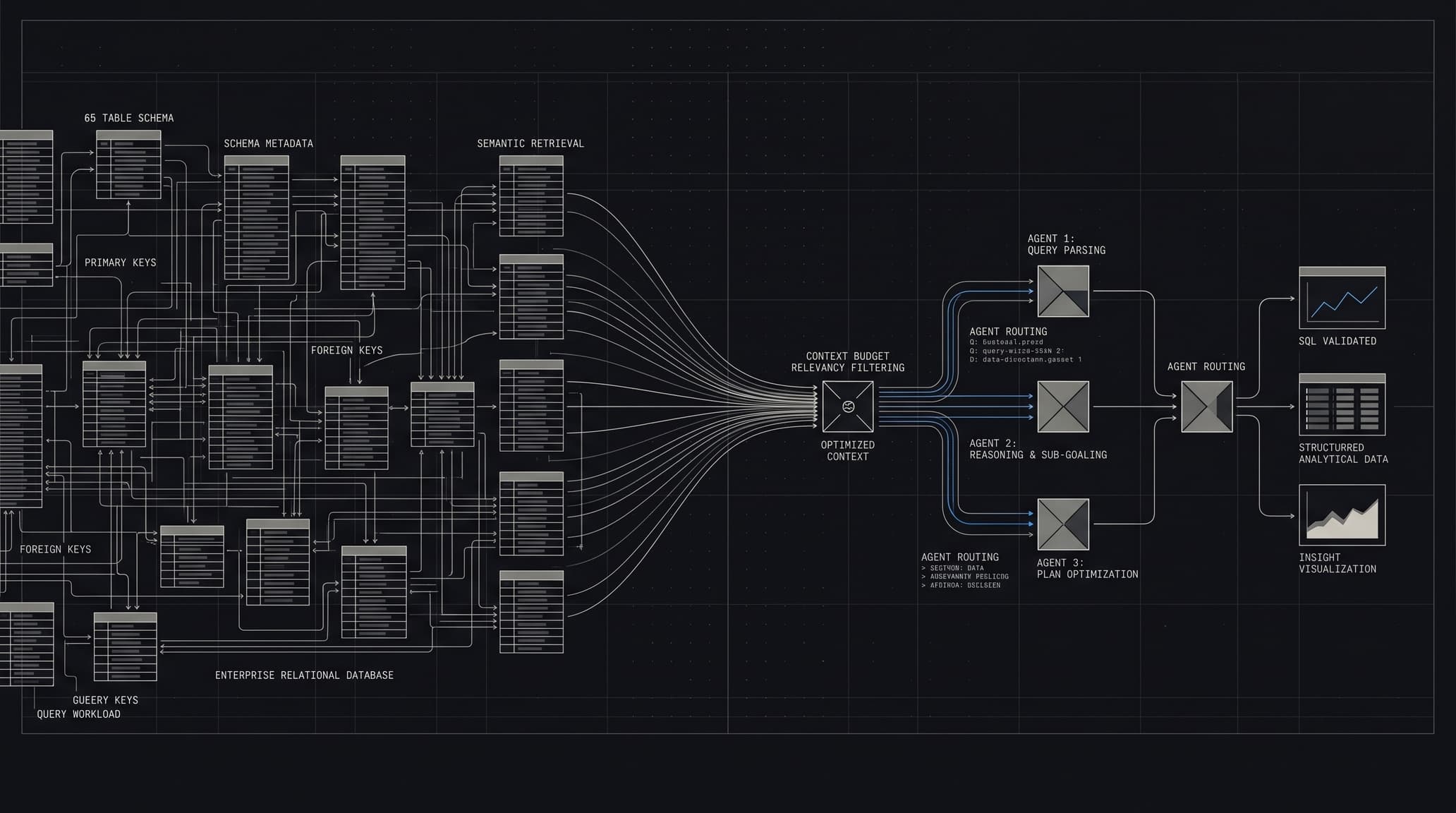
Agentic Text-to-SQL platform that profiles relational databases into a semantic metadata layer, retrieves relationship-aware context under deterministic budgets, and validates generated SQL before presenting analytical results.
EVIDENCE BRIEF
PROBLEM
Large relational databases create context-window pressure and irrelevant schema noise for Text-to-SQL systems. Relevant tables can also require intermediate relationship paths, making naive table retrieval insufficient and increasing the risk of unsupported joins.
SOLUTION
Combines offline schema profiling and semantic metadata generation with pgvector retrieval, relationship-aware schema graph expansion, and deterministic token budgeting. LangGraph orchestrates SQL generation, query execution, semantic validation, and automated error recovery, delivered through a FastAPI streaming API and a Next.js analytical workspace.
OUTCOMES
Completed a runnable end-to-end system spanning incremental database profiling, semantic retrieval, deterministic schema/context guards, SQL validation and recovery, API streaming, and a browser-based analytical workspace.
- SCHEMA SCALE
- 65-TABLE ENTERPRISE ARCHITECTURE
- GUARD MODES
- TINY / STANDARD / DEEP
CLIENT REMARK
The system shows a strong understanding of how agentic analytics should be approached in practice. What stood out was the way schema understanding, retrieval, SQL generation, validation, and recovery were treated as parts of one complete workflow rather than isolated features. It reflects solid engineering judgment and a thoughtful approach to building reliable AI-driven data systems.
Ali Khuzema
Principal AI Engineer, Systems Limited
descriptionREADME.md
MARKDOWN SPECAutonomous Data Analyst
Autonomous Data Analyst (ADA) is an agentic Text-to-SQL system for PostgreSQL. It profiles a relational database offline, then uses the resulting semantic and relationship metadata to assemble a constrained schema context for natural-language SQL generation, validation, and result presentation.
Project Context
ADA addresses the engineering gap between a user asking a data question and an LLM receiving enough trustworthy database context to answer it. Rather than placing a complete database DDL in every prompt, the system builds and persists a compact metadata layer, then retrieves and expands only the portion needed for a request.
The repository contains a runnable Python/FastAPI backend, a Next.js frontend, a CLI entry point, and PostgreSQL-backed profiling artifacts.
The Problem
Text-to-SQL becomes substantially harder when a database spans many tables and schemas. Supplying all tables and columns to a model creates context-window pressure and introduces irrelevant names that can distract generation. More importantly, a relevant answer may require tables that are semantically different but connected through intermediate relations; omitting those links can lead to unsupported or hallucinated joins.
ADA’s implementation addresses these issues by retrieving table and schema metadata semantically, retaining discovered relationship edges, inserting bridge tables when a join path requires them, and pruning column payloads before SQL generation. The goal is to give the model a smaller, grounded representation of the database rather than its raw full schema.
The Solution
ADA is organized as two stages:
- Offline profiling reflects the target database and persists summaries, detailed schema metadata, embeddings, and relationship artifacts in PostgreSQL.
- Runtime agentic query workflow normalizes a question, retrieves and budgets relevant context, generates SQL, validates execution, attempts grounded recovery when appropriate, and prepares a tabular result with chart recommendations.
System Architecture
At profiling time, SQLAlchemy reflection and sampled rows are transformed into table-level metadata. The pipeline writes that metadata to an agents schema alongside vectors and relation edges. At runtime, semantic retrieval begins from those artifacts rather than from live DDL; the assembled context then moves through the LangGraph SQL workflow.
flowchart LR
    DB[(PostgreSQL source database)] --> P[Offline profiling]
    P --> A[(agents schema: tables, schemas, relations)]
    U[User question] --> N[Normalize and plan]
    A --> R[Semantic retrieval]
    R --> S[Relationship-aware schema assembly and budgets]
    S --> W[LangGraph: SQL, validation, recovery, visualization]
    W --> DB
    W --> API[FastAPI]
    API --> UI[Next.js]
Offline Profiling Pipeline
The pipeline in src/profiling/ builds the runtime knowledge layer.
- Schema extraction: reflects configured PostgreSQL schemas with SQLAlchemy and captures columns, primary keys, foreign keys, and a small sample of rows per table.
- Change detection: computes a hash from each reflected table definition. On an append run, only new or changed tables are re-summarized and re-embedded;
PIPELINE_REFRESH_MODE=rebuildclears profiling artifacts first. - Summarization: uses an LLM to produce concise table summaries and, separately, schema-domain summaries. Detailed schema records combine reflected columns, summaries, and sampled values.
- Relationship mapping: persists explicit foreign-key edges and can add high-confidence, LLM-derived non-FK relations from batches of table summaries. Each relation records its source.
- Embeddings and persistence: stores table and schema embedding text, vectors, JSON metadata, and relation edges in
agents.agent_tables,agents.agent_schemas, andagents.agent_relations. The pipeline creates thevectorextension and attempts pgvector IVFFlat indexes with fallbacks.
Runtime Query Pipeline
For each question, the runtime composes a retrieval state and executes the agent graph.
- Query normalization: a LangGraph normalizer discovers candidate schemas through schema-vector search, finds grounded table-name candidates, retrieves supporting metadata, and creates a compact plan.
- Semantic retrieval: the normalized retrieval query is embedded and matched against
agents.agent_tablesusing pgvector cosine distance. - Relationship-aware expansion: if retrieved tables are disconnected, the schema builder uses the persisted relation graph and shortest paths to add intermediate bridge tables.
- Budget and guard evaluation: deterministic complexity and schema guards select
tiny,standard, ordeepcaps, and can prune table/column context or block unbounded scopes. Budgets cover normalization, candidate tables, bridge tables, columns, estimated schema tokens, and SQL-generation tokens. - Schema pruning: join columns, identifier-style columns, time fields, and terms relevant to the normalized plan are preserved while nonessential columns are reduced.
- SQL generation: the SQL agent receives the normalized request, selected detailed schemas, join paths, follow-up context, and prior validation feedback. It requests structured output containing one SQL query.
- Validation and recovery: generated SQL is executed through SQLAlchemy. On an execution failure, the LangGraph workflow can recover matching schema objects from metadata, rebuild a strict context, and retry; it allows up to three retry increments before terminal failure.
- Result preparation: successful results receive in-memory preview/pagination metadata and optional CSV export support. A visualization agent returns validated frontend chart recommendations for bar, line, or pie charts.
Engineering Highlights
- Deterministic context budgeting: route-aware budget plans and schema-token estimation constrain how much metadata reaches the SQL prompt, with a second stricter pruning pass when needed.
- Relational graph traversal: NetworkX-backed shortest-path expansion supplies bridge tables when independently retrieved tables need a connection.
- Grounded schema pruning: the builder retains join-critical fields and query-relevant columns instead of passing full table definitions by default.
- Autonomous validation and recovery: execution feedback is fed into retry generation; a metadata-based schema recovery step declines regeneration when recovery confidence is low.
- Incremental profiling: DDL hashes avoid recomputing artifacts for unchanged tables during append-mode profiling.
- Runtime diagnostics: query responses expose route information, per-stage token usage, timings, guard decisions, schema-budget reasons, retry state, and recovery traces. The streaming endpoint emits workflow progress and a bounded number of row events.
- Chat-provider abstraction: chat models can be created through the default OpenAI-compatible client, Azure OpenAI, or Ollama based on environment configuration. Embedding requests use the configured OpenAI-compatible embedding endpoint.
Backend & Frontend
The FastAPI application in backend/ exposes synchronous and Server-Sent Events query endpoints, result pagination/CSV export, session history, and profiling administration routes. Conversation turns and summaries are persisted in PostgreSQL; result previews are held in a process-local, time-limited cache.
The Next.js application in ui/ provides the query workspace, generated SQL, result table, chart rendering, diagnostics, session controls, and a profiling page. Its route handlers proxy standard queries and profiling requests to the backend. The browser can also connect directly to FastAPI’s streaming endpoint when the corresponding frontend environment flag is enabled.
Technology Stack
- Backend: Python 3.11, FastAPI, Uvicorn, Pydantic, Server-Sent Events
- AI / orchestration: LangChain, LangGraph, OpenAI-compatible APIs, Azure OpenAI, Ollama
- Data: PostgreSQL, pgvector, SQLAlchemy, psycopg, NetworkX, SQLGlot
- Frontend: Next.js 16, React 19, TypeScript, Recharts
- Infrastructure / tooling: uv, npm, Loguru
Project Structure
.
├── src/
│   ├── profiling/          # Reflection, summaries, embeddings, relations, artifacts
│   ├── runtime/            # Normalization, retrieval, schema assembly, budget guards
│   └── agents/             # SQL, validation, recovery, visualization, LangGraph workflow
├── backend/                # FastAPI API, sessions, profiling endpoints, result cache
├── tools/                  # Provider construction and UI bridge
├── ui/                     # Next.js application and backend proxy routes
├── main.py                 # CLI: profile then interactively query
├── pyproject.toml          # Python project and dependency definition
└── ui/package.json         # Frontend scripts and dependencies
Running Locally
Prerequisites: Python 3.11, uv, Node.js/npm, and a PostgreSQL instance where the configured account may create the vector extension and agents schema.
git clone https://github.com/Zeeshan506/ADA_Sysltd.git autonomous-data-analyst
cd autonomous-data-analyst

uv sync --python 3.11
cd ui && npm install
cd ..
Configure the environment variables below before profiling or querying. Then run one of the following from the repository root:
# Run profiling, then the interactive CLI query loop.
uv run python main.py

# Run only the offline profiling pipeline.
uv run python -m src.profiling.pipeline

# Run the FastAPI backend.
uv run uvicorn backend.main:app --host 0.0.0.0 --port 8000
In a second terminal, start the frontend:
cd ui
npm run dev -- --hostname 0.0.0.0 --port 8080
Open http://localhost:8080. The backend’s health endpoint is http://127.0.0.1:8000/health.
Environment Configuration
Set variable names in a root .env file; do not commit credentials.
Core database and embedding configuration
DATABASE_URLOPENAI_API_KEYOPENAI_API_BASEEMBEDDING_MODELEMBEDDING_DIMENSIONS
DATABASE_URL is required. The embedding implementation uses OPENAI_API_KEY and an OpenAI-compatible embedding endpoint; OPENAI_API_BASE overrides its default endpoint.
Chat provider selection
- Default OpenAI-compatible chat:
LLM_MODEL,SUMMARIZATION_MODEL,SQL_AGENT_MODEL,RETRIEVAL_MODEL,RELATION_MAPPING_MODEL,SCHEMA_SUMMARIZATION_MODEL - Azure OpenAI:
USE_AZURE,AZURE_APIKEYorAZURE_API_KEY, and eitherTARGET_URLorAZURE_ENDPOINT; optionalAZURE_DEPLOYMENTandAZURE_API_VERSION - Ollama:
USE_OLLAMA,OLLAMA_MODEL
Runtime and profiling controls
PIPELINE_STAGE,PIPELINE_REFRESH_MODE,RUN_PROFILING_PIPELINESAMPLE_ROWS,PROFILING_OUTPUT_DIR,INTER_TABLE_DELAY_SECONDSRELATION_MAPPING_MAX_TABLES_PER_BATCH,RELATION_MAPPING_MIN_CONFIDENCEQUERY_STREAM_ROW_LIMIT,RETRIEVAL_MAX_TOKENS,SQL_DIALECTRESULT_PAGE_SIZE,RESULT_MAX_PAGE_SIZE,RESULT_CACHE_TTL_SECONDS,RESULT_CACHE_MAX_ROWS,RESULT_CACHE_MAX_BYTESBACKEND_CORS_ORIGINS,NEXT_PUBLIC_BACKEND_URL,NEXT_PUBLIC_UI_USE_FASTAPI_STREAM,NEXT_PUBLIC_UI_STREAM_RETRY_COUNT
Example Queries
- “Show total sales by territory for the last quarter.”
- “List active employees with their current department.”
- “Which products have the highest inventory movement by category?”
The actual tables, schemas, and query vocabulary depend on the database profiled into the agents schema.
Current Status
The repository implements the offline profiling pipeline, PostgreSQL/pgvector artifact storage, semantic table and schema retrieval, relation-aware schema construction, deterministic budget guards, the LangGraph SQL/validation/recovery/visualization workflow, FastAPI query and profiling APIs, SSE progress streaming, PostgreSQL conversation storage, result preview/pagination/CSV export, and the Next.js interface.
There is no formal automated test suite configured in the repository at present.
Limitations
- The profiling pipeline currently reflects a fixed set of schema names defined in
src/profiling/pipeline_config.py; schema selection is not exposed as an environment setting. - Query execution materializes result rows in process memory before previewing or caching them. Cache limits bound what is retained, but they do not impose a database-side query timeout or row limit.
- Generated SQL is prompted as a
SELECTquery, but the validation path executes the generated statement through SQLAlchemy. Deploy with a least-privilege, read-only database account; the direct SQL rerun endpoint uses only a prefix-level read-only check. - Semantic retrieval and LLM-derived relationships improve context grounding but do not guarantee SQL correctness. Generated SQL is validated by execution, not by a complete policy or semantic verifier.
- Profiling requires PostgreSQL with pgvector and permissions to create the
agentsschema and vector extension.
License
No license file is currently included in this repository. Add an explicit license before treating the project as reusable under a particular license.